After you install East-Scout Professional, it
must be "registered" to run on YOUR computer in order to remove the Trial Mode
restrictions. This process, which is sometimes
referred to as "activating" software, is required each
time Easy-Scout Professional is installed on a different computer.
Since Easy-Scout Professional's Trial mode
provides access to 95% of its features, you can begin to learn and use the main
features of the software without registering, or activating the software. Also, any information that is entered while running
in Trial Mode will be retained when you complete the Registration
(Activation) process as explained below. You have 21 days to register, or
activate the software from the date you installed it.
To complete the Registration/Activation
process:
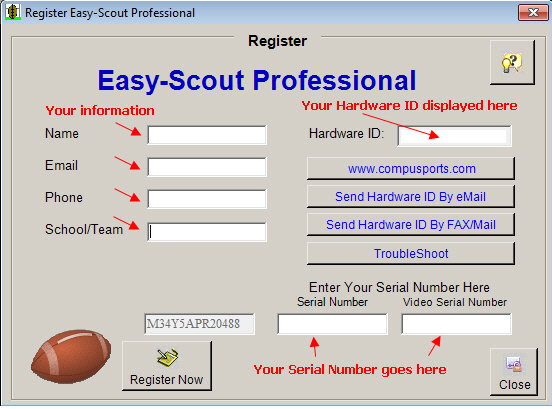
Click the Help Menu and select
Register Easy-Scout
to display the screen below. Your screen will look identical, except
with one exception - the Hardware ID number.
Notice that the Hardware ID number is
displayed in just beneath the Help Icon in the upper right of the
registration screen.
This number is unique to every computer (i.e. every computer will display
something different in this space), and is used by us to generate a Serial
Number and, if you purchased the Video Publishing module, a video serial
number that will match the Hardware ID for your computer. We will return
serial number(s) to you by email that you will enter in the boxes at the bottom of the screen
and click Register Now to
complete the Activation process.
Send us your Registration Information
Since two computers never have the same Easy-Scout Hardware ID, we ALWAYS need
the Hardware ID number that is displayed on your computer when Easy-Scout is
installed and operating in Trial Mode.
(see image above)
If you use a software application such as Microsoft Outlook to send and
receive email, you can use the Send by eMail feature to create an
email that will include all of the necessary information that we need to
generate your serial number(s). To do this, enter your Name, Email
address, Telephone number, and School/Team on the screen that is shown above. We suggest
that you "cc" yourself to make sure the email was actually sent.
After your registration information is
processed you will receive a Serial Number and, if you purchased the
*Video Publishing Module, a Video Serial Number.
While waiting for your Serial Number(s), you
can continue work in Trial Mode by closing the Registration Screen.
You can return to the Registration screen at any time by clicking Register
Easy-Scout from the Help Menu.
* Easy-Scout Professional is available with and
without its video publishing module enabled. In order to use the video
publishing module, a two-part serial number must be entered, with
the second part being the Video Serial Number.
When you receive your Serial Number(s) from us, complete the final step in Registration process by entering the Serial Number(s)
that we issued to you, complete any missing information
in the Registration Screen, and click the Register
Now button. You should immediately see a confirmation message that your
registration was successful. Once Easy-Scout Professional is
registered and activated, all restrictions are removed.
-
Click CLOSE to return to the Easy-Scout Professional Menu/Toolbar screen.
* Please note that each computer requires a unique serial number and a
license.
BACK TO INDEX