This version of Easy-Recruiter has a standard installation process for single user mode. To use this program in a network environment to support multiple users follow these steps.
- Complete Single User Install procedure on your local workstation.
Choose one of the following options:
- (Option 1) Complete Single User Install procedure on a network file Server (or a machine that can be accessed by all users through the Windows Network Neighborhood utility).
- (Option 2) Copy the entire Data folder from your local workstation to the network file server or a central location. This folder is typically found at ..\Program Files\CompuSports\Easy-Recruiter.
- Launch the application on your workstation and Login with a System Administrator user account.
- Use the Task Bar to access the Settings Pane.
- Use Advanced Data Settings to specify Network User and Database Location on the Data tab in the lower control panel.
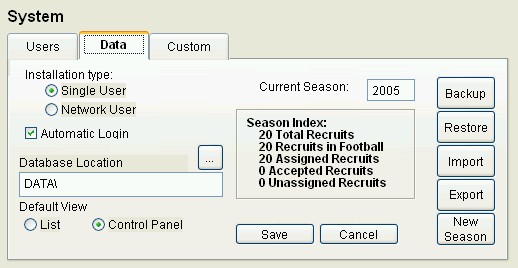
- Use the ellipse button (...) on Database Location to identify the central database location on the File Server. This dialog is looking for a folder or directory called Data that contains a file named ezr.dbc.
- Save your changes on the Data tab.
- Make note of the central database location on the Network file server. If the defaults are used during the installation, it should be something similar to: c:\Program Files\CompuSports\Easy Recruiter\DATA