In this version of Easy-Recruiter it is possible to begin using the Personal Edition (Single User mode), and then reconfigure your settings to the Enterprise Edition (Network User) mode.
If you do need to upgrade your program from Single User to Network User, it is possible to carry forward information previously entered to the central database used by multiple users in a network environment.
The following steps outline this process.
If you do need to upgrade your program from Single User to Network User, it is possible to carry forward information previously entered to the central database used by multiple users in a network environment.
The following steps outline this process.
- Install a registered version of Easy-Recruiter on a central computer or network file server.
- Launch the application and Login as a System Administrator.
- Use the Task Bar to access the Settings Pane.
- Use Advanced Data Settings to specify Network User and Central Database Location on the Data tab in the lower control panel.
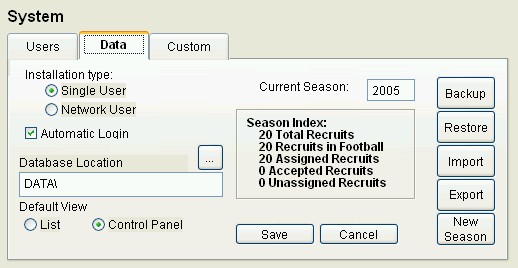
- Use the ellipse button (...) on Database Location on the File Server. This dialog is looking for a folder or directory called Data that contains a file named ezr.dbc.
- Save your changes on the Data tab.