The Reports Pane of Easy-Recruiter allows you to combine one of the built-in Basic Reports with the current Athlete Search result to filter the list of records sent to the printer to specifically suit your needs.
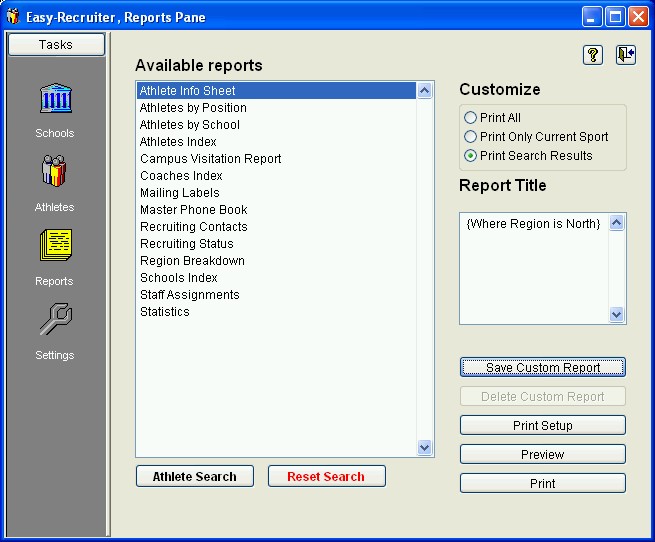 To Customize a Basic Report:
- (Optional) Use the Search button on either the Athlete Pane or the Schools Pane. Then select the report you wish to print from the Available Reports list.
- You can also select an athlete or school report on the Reports Pane first, then use the Search button to launch the appropriate Search Features.
- Use the Customized Options (explained below) on the Reports Pane to specify which records you wish to print.
- (Optional) Use the Report Title area to specify a personalized sub-title for the selected report.
You can save the combination of the currently selected report and current search criteria for later use by using the
Save Custom Report button.
Customize Options: Use these settings in the upper right corner of the
Reports Pane to specify which records to include when generating the selected report for a print preview and/or printed output.
- Print All - Prints the entire list of Athletes, Schools, or Coaches. (Current sport and search criteria ignored.)
- Print Current List - Prints the list of athletes for the Current Sport.
- Print Search Results - Prints the list of athletes or schools for the current Search results; Only available for athlete and school related reports.
See also:
 Customizing Reports