 Screen Overview
| Easy-Recruiter v2.x |
| Screen Overview
|
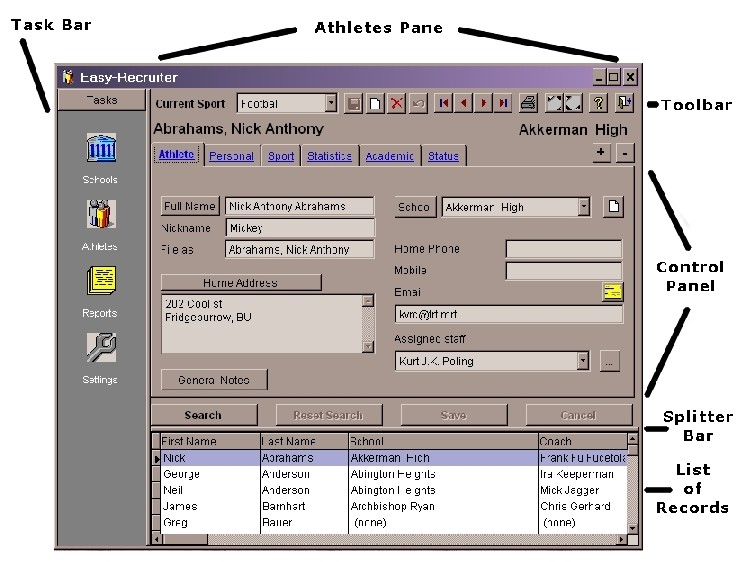
Each pane includes Toolbar buttons across the top to trigger various data entry functions and other related features.
The Athletes Pane is the first of the two main areas and contains detailed information about each recruited athlete. A control panel organizes information in a manner that groups similar information together on different "tabs" for ease of date entry, editing and viewing. Below the control panel is a "grid" that provides a List of Records in a columnar view of the Athletes in the system and makes it possible to quickly locate an athlete or group of athletes based on one or a number of criteria.
The Schools Pane is the second of these two main areas and contains detailed information about a High School. In a similar fashion, the upper portion of this pane contains a control panel with details for a given shcool grouped by tab. Below the control panel is a grid showing the list of all high schools currently enter in the program.
Easy-Recruiter associates each Athlete with a (High) School and a HS Coach through a link to the Schools contact management area. This pane also lists the coaches (yet another type of contact) for the various sports at each school. When an Athlete is added to the system, if his/her High School is in the system, simply selecting the school from a list "links" that athlete to all of the School information, including the coach at that school for the Current Sport if available. This method of "relating" information between the different contact management types - Athletes, Schools and Coaches; is what separates Easy-Recruiter from other, general purpose contact management systems
See also:
| Last Updated: 11/11/04 |