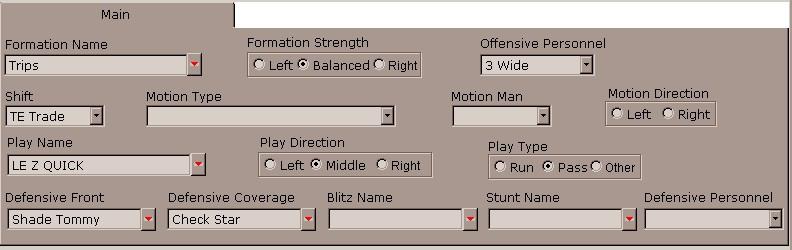
FORMATION NAME - Type the formation name or select it from of the Intelligent Pick List, by clicking on the red arrow. There is a maximum value of 20 characters in this filed. It is good practice to check the list box before typing in a new Formation to avoid errors and duplicates. As is the case with any pick list, names can be found quickly by typing the first letter and then using the arrow keys.
Defining the strength designation field is optional. However it is necessary to indicate the strength of the formation in the next date element entry. For example, if the formation is a Pro I Right, it could be entered as Pro I for the formation and R for the strength. When analyzing formations, the result would be based on tendencies of all Pro I formations. If Pro I R or Pro I L is entered the result bares separate tendencies for Pro I R and Pro I L, specifically.
It is critical that formations are named EXACTLY the same each time. For example, Pro I R (with a space between the I and the R) will be treated differently than Pro IR (with no space). Mistakes can be identified by viewing the Play-by-Play report or by using the Find function to quickly correct it before printing reports.
IMPORTANT: The Formation and Play name entries are "case sensitive". This means that PRO I and Pro I are treated as different entries.
FORMATION STRENGTH - Select Left, Right, or Balanced (formation) by clicking on the appropriate "radio button". Determining the strength of formations must be consistent. It has been recommend that the Tight End be used as the strength. In a balanced backfield set select B, which indicates a totally balanced (line and backfield) formation.
NOTE: Punts, field goals, or extra points, should be entered as "B".
OFFENSIVE PERSONNEL - Select an Offensive Personnel Group from the Pick List. Additional Offensive Personnel Groups can be added by using the Maintain Lists option on the utility menu.
SHIFT - Select a Shift type from the Pick List. Additional shift types can be added by using the Maintain Lists option or by using the utility menu.
MOTION TYPE - Select a Motion type from the Pick List. Additional motion types can be added to the list by using the Maintain Lists option on the utility menu.
MAN IN MOTION - Choose the motion man from the motion from pick list. Choices include the entire list of Receivers and Ball carriers. Other choices can be added by using the Maintain Lists option on the utility menu.
MOTION DIRECTION - Choose Left or Right by clicking on the appropriate radio button.
NOTE: For reverse motion, we recommend using the last direction in which the player was moving.
PLAY NAME - Type in the name of the play or select the play from the Intelligent Pick List. The play name can be any combination of numbers and letters up to 20 characters and should always be entered exactly the same way (ex: Load Option and LoadOpt will be considered different plays).
NOTE: The same considerations apply as described under the Formation Name entry, however the effect on the reports is less significant, since the Play Name is not used in the same manner in which we use the Formation name (as a criteria) when grouping and calculating tendencies.
PLAY DIRECTION - Click the Left or Right radio button. For a play run directly over the center, Drop back Pass, Punt, Extra Point, Field Goal or a Broken Play - click Mid(dle)
PLAY TYPE - Click the radio button for Run, Pass or Other. We recommend that information is not recorded about incomplete or Broken Plays, Quick Sacks, Penalties or kicking game plays. However to include these play types in the tendency reports, click Other.
DEFENSIVE FRONT - Type the name of the Defensive Front into the Intelligent Pick List, or select it from the list clicking on the red arrow. There is a maximum value of 20 characters in this field.
It is crucial to enter exactly the same name of a defensive front to avoid recording repeating names. Viewing the Play-by-Play report or using the Find function to make corrections before printing other reports can identify mistakes.
IMPORTANT: The Defensive Front and Defensive Coverage name entries are "case sensitive". This means that 50 BASE and 50 Base are treated as different entries.
DEFENSIVE COVERAGE- Type in the name of the Coverage or select it from Intelligent Pick List. The coverage name can be any combination of numbers and letters up to 20 characters and should always be entered exactly the same way (ex: Cover 1 and Cover1 will be considered different coverages).
BLITZ NAME - Type a name for the Blitz into the Intelligent Pick List, or select it the name from the list if it already exists. There are a maximum number of 15 characters allowed in this field.
STUNT NAME - Type a name for the Stunt into the Intelligent Pick List, or select it from the list. There are a maximum number of 15 characters allowed in this field.
DEFENSIVE PERSONNEL - Select a Defensive Personnel Group from the Pick List. Additional Defensive Personnel Groups can be added by using the Maintain Lists option on the utility menu.
See aslo Modify Lists, Settings.