You can access all the various features of Easy-Scout XP one of the following two ways:
- by using the menu bars listed along the top of the main window (File, Edit, Game, Report Manager, Utilities, Help)
- or by using the collection of picture buttons know as the toolbar located below the menu bars.
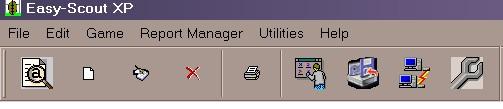
Each button on the toolbar will launch a particular screen or form for each related feature listed below.
 | View Game-For organizing game information. See also View an Existing Game. |
 | Add Game-For creating a new game before recording play information. See also Add a New Game. |
 | Edit Game-For editing information in an existing game. See also Edit and Existing Game. |
 | Delete Game-For removing game information. See also Delete an Existing Game. |
 | Report Manager-For generating printed documentation. See also Report Manager Overview. |
 | Modify Lists-For customizing data entry options. See also Modify Lists. |
 | Backup-For creating/restoring external information. See also Backup/Restore Feature. |
 | Import/Export Games-For creating/retrieving external information. See also Import/Export Games. |
 | Application Settings-For customizing miscellaneous features. See also Settings. |